
We are thrilled to announce the release of ABCD 3.3.0. This version represents a significant milestone in the software’s lifecycle, focusing heavily on three pillars: Security, Administrative Autonomy, and User Experience (UX).
Many of these improvements were born from the real needs of the community of operators who require more agile tools for maintenance, backup, and diagnosis, without relying excessively on direct server access (shell/terminal).
Below, we detail the main new features of this version.
🛠 New Administrative Tools
Version 3.3.0 introduces a set of utilities that transform the way administrators interact with the system.
1. Integrated Backup Manager
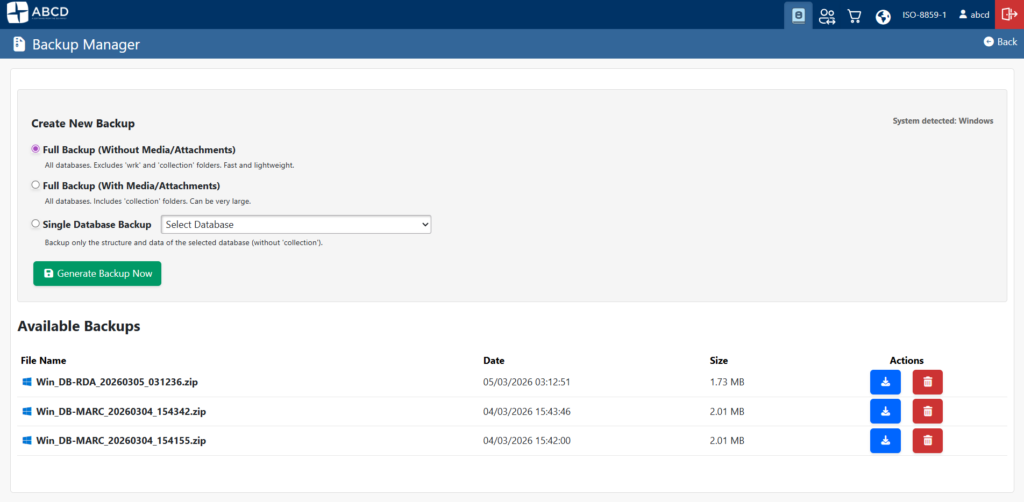
Answering long-standing requests, it is now possible to perform backups directly through the web interface. The new Backup Manager (admin_backup.php) eliminates the need for complex command-line scripts for most routine tasks.
- Three backup modes:
- Databases Only: Fast, saves only bibliographic data.
- Databases + Media: Full backup including the
collectionfolder (images, PDFs, etc.). - Single Database: Select a specific database to generate a backup.
- Secure Storage: Files are generated in the
bases/wrk/backupsfolder, separate from ISO files, avoiding confusion. - Portability: The system automatically detects the Operating System and adds prefixes (
Win_orLin_) to the files, facilitating origin identification. - Download and Cleanup: Download the generated
.zipfile to your local machine and delete it from the server with a single click.- Technical Note: This functionality requires the
php-zipextension installed on the server.
- Technical Note: This functionality requires the
2. Windows/Linux Database Converter (Crunchmf)
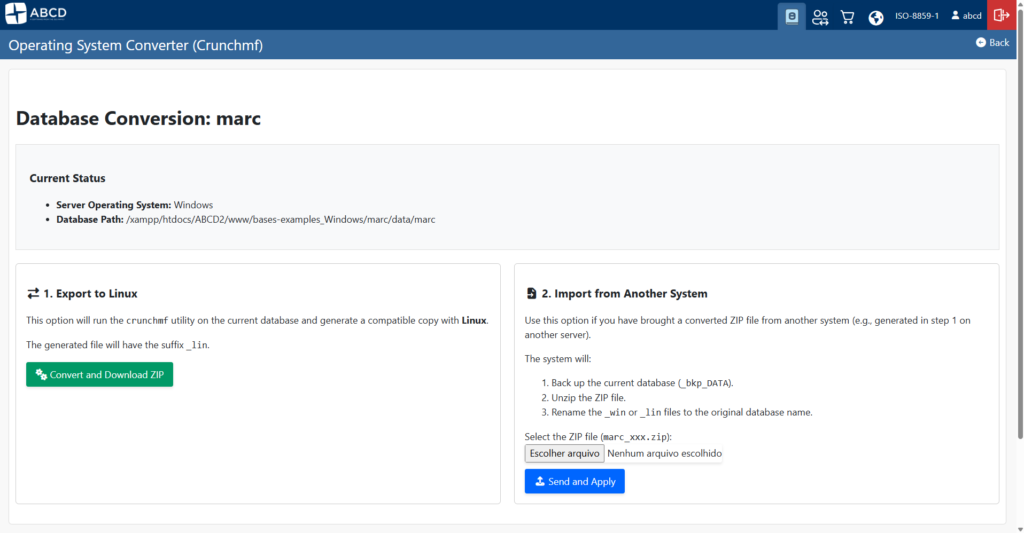
Migrating databases between Windows and Linux servers has always been a point of attention due to binary file compatibility (.mst and .xrf). The new Export/Import utility (db_convert_crunchmf.php) uses the CISIS crunchmf tool to automate this conversion:
- Convert a database to the opposite operating system with one click.
- The system generates, compresses, and makes the converted database available for download.
- Upload a converted database, and the system handles restoration, automatically keeping a backup of the previous version.
3. Error Log Viewer
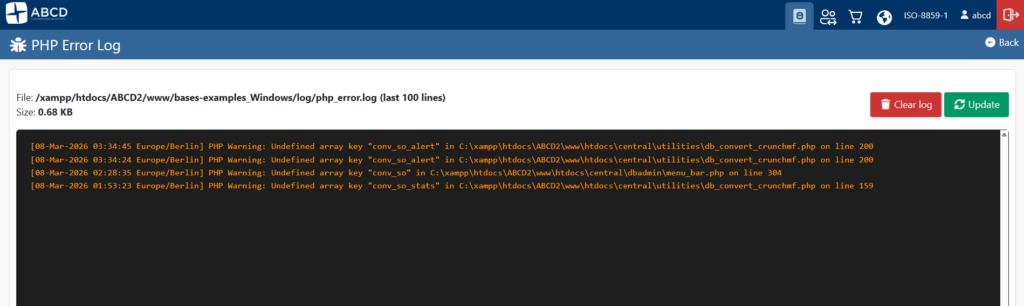
Diagnosing problems in shared hosting (like cPanel) or restricted servers has become easier. The new viewer allows reading the PHP error log directly through ABCD.
- Real-time viewing (reads the file from the end to the beginning).
- To activate, simply add a small block of code to your
config.phpdefining the log path to thebases/log/folder.
🔒 Security and Infrastructure
show_image.php Hardening

The script responsible for displaying images and digital documents has been rewritten with a total focus on security and robustness:
- Login Verification: Now strictly checks if the user is logged in (
permiso) before displaying restricted files. - Path Traversal Prevention: Implementation of
realpathand checks to ensure malicious users cannot access files outside allowed directories. - Error Messages: Improved error handling (e.g., file not found or permission denied) to facilitate debugging without exposing sensitive data.
Database Portability
The %path_database% wildcard variable has been implemented. This allows image and document paths to be relative, greatly facilitating life for those who need to move ABCD from one folder to another or migrate servers without breaking image links.
🎨 Interface and Usability (UI/UX)
Navigation and appearance received fine-tuning to make daily use more fluid (PR #601).
- Optimized Navigation:
- The OPAC access button has been moved to the top, gaining prominence.
- Module Buttons (Cataloging, Circulation, Acquisitions) are now persistent, allowing quick context switching.
- The language selector has been moved to the footer, cleaning up the main interface.
- Customization: New options in the
abcd.defeditor allow hiding buttons and the database selector. Ideal for institutions working with a single database that want a cleaner interface. - Data Entry:
- Correction in the “accordion” behavior (
+and-signs). - Alignment and width adjustments in cataloging forms.
- Correction in the “accordion” behavior (
- Image Viewer: Now features a native button for Full Screen viewing.
🌐 OPAC Improvements
The public catalog also received special attention:
- CEPAL Model: The CEPAL model database is now fully functional in OPAC, with a new Bootstrap-based template (
opac.pft). - PHP 8+ Compatibility (PR #605): Fixes for deprecated functions and inclusion of polyfills (like
str_contains) ensure OPAC runs smoothly on both modern and older servers. - Log Fixes: Eliminated error messages related to log writing permissions in OPAC.
How to Update?
To take advantage of all these features, we recommend updating immediately.
- Reminder: For the Backup Manager to work, ensure the
zipextension is enabled in your PHP. - Logs: To use the log viewer, check the
config.phpconfiguration instructions in the documentation.
Acknowledgments: This version is the result of intense community collaboration. We thank everyone who tested, reported bugs, and sent suggestions.
The ABCD Development Team

 ABCD Global
[…] ABCD 3.3.0 was officially released March 9, 2026. The release added a web-based backup manager, Windows/Linux database conversion, error-log viewing, security hardening, portability improvements, interface changes, OPAC improvements, and PHP 8 compatibility work. Its backup manager requires the PHP zip extension. See the ABCD 3.3.0 release announcement. […]
[…] ABCD 3.3.0 was officially released on March 9, 2026. The release added a web-based backup manager, Windows/Linux database conversion, error-log viewing, security hardening, portability improvements, user-interface changes, OPAC improvements, and PHP 8 compatibility work. Its backup manager requires the PHP zip extension. See the ABCD 3.3.0 announcement. […]